
Writing Gurbani
ਗੁਰਬਾਣੀ ਲਿਖਣਾ
Free tools for writing Gurbani: type in Gurmukhi online or install a phonetic Gurmukhi keyboard, then preview and download Gurmukhi fonts, Unicode and legacy.
Typing in Gurmukhi
Type Gurmukhi in Unicode, the standard that works in email, Word, WhatsApp and search engines and in our Gurbani Searcher. The keyboard is phonetic: ਸ sits on S, ਕ on K, ਮ on M, so English typists find their way in minutes.
Try it: type a w for ਆ, s q i for ਸਤਿ, a 1 for ੧. On a phone, the keys above work by tapping; your phone’s own Punjabi keyboard also types straight into the box.
Install the keyboard on your Windows computer
This online pad works on the same layout as the Punjabi Unicode Keyboard – “my best” by Dr Kulbir Singh Thind. Install it once and you can type Gurmukhi in every program on your computer.
- Download the keyboard (Windows, 0.5 MB)
- Right-click the downloaded file → Extract All…
- Open the folder Installer Items and double-click setup.exe. Windows installs the right version for your computer.
- Restart the computer, or sign out and back in.
- Press Win + Space (or click ENG on the taskbar) and choose Punjabi – Punjabi Keyboard-my best. Press it again to switch back to English.
Remove it any time from Settings → Time & language → Language & region → Punjabi → Keyboards.
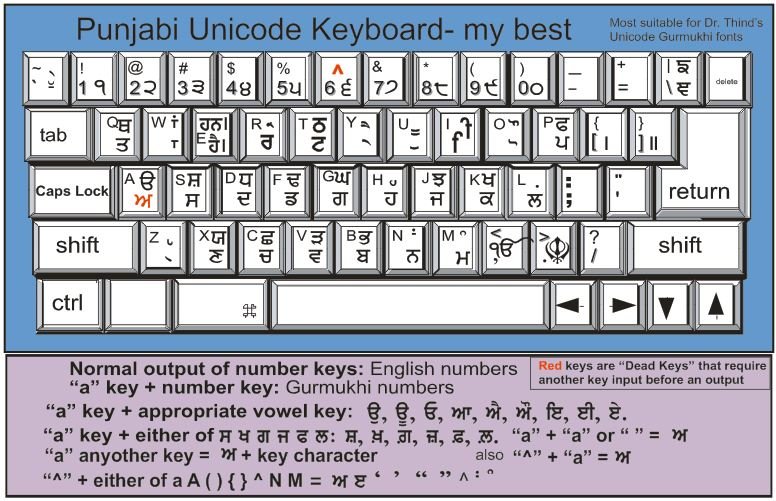
Special keys
| Type this | To get |
|---|---|
| a then a vowel key: w i I u U y Y o O | ਆ ਇ ਈ ਉ ਊ ਏ ਐ ਓ ਔ |
| a then a number key | ੧ ੨ ੩ … ੦ (numbers alone stay English) |
| a a or a space | ਅ |
| Shift+A · ^ then Shift+A | ੳ · ੲ |
| Shift+N · Shift+M · ` | ਂ ਬਿੰਦੀ · ੰ ਟਿੱਪੀ · ੱ ਅੱਧਕ |
| Shift+R · Shift+H · ~ | ੍ਰ ਪੈਰ ਰਾਰਾ · ੍ਹ ਪੈਰ ਹਾਹਾ · ੍ ਹਲੰਤ |
| ^ then Shift+N | ਃ ਵਿਸਰਗ |
| [ · ] | । · ॥ |
| Shift+, · Shift+. | ੴ · ☬ |
| e · Shift+E · Shift+S · Shift+W | ਹੈ। · ਹਨ। · ਨੂੰ · ਾਂ |
| ^ then ( ) { } | ‘ ’ “ ” |
Type letters in the order you say them: for ਕਿ press k then i; the sihari moves into place by itself.
Gurmukhi Fonts
Type or paste any Gurmukhi and see it in every font at once. Download the font you like, or copy the text ready for it.
Unicode fonts: for everyday use
Text stays real Gurmukhi in any font: you can search it, send it and paste it anywhere. Use these with the keyboard above, on websites and on phones.
Legacy fonts: for print and design
The 40 older Jatt fonts give you many styles for posters, books and cards. They use English letters drawn as Gurmukhi, so the text looks right only while that font is chosen. Use Copy for this font, paste into Word or CorelDRAW, then select the font.
Try your text
Recommendations
- For ੴ, use Raavi, Satluj or Noto Serif Gurmukhi.
- For Gurbani subscripts, special signs and symbols, use the AnmolUni font (download it below).
- For Gurbani, in general, use any font of your choice.
Unicode fonts
AnmolUni
UnicodeNoto Serif Gurmukhi
UnicodeNoto Sans Gurmukhi
UnicodeMukta Mahee
UnicodeBaloo Paaji 2
UnicodeAnek Gurmukhi
UnicodeTiro Gurmukhi
UnicodeRaavi
UnicodeLegacy fonts: the Jatt collection
Install a font: double-click the downloaded .ttf file → Install. The Jatt fonts are freeware from JattSite.com.
We are grateful to Kulbir Singh Thind for permitting us to use the Gurmukhi fonts and typing software.