

ਗੁਰਬਾਣੀ ਨਾਲ ਸੈਰWalking with Gurbani
ਗੁਰਬਾਣੀ ਨੂੰ ਸਮਝਣ ਲਈ ਅਹਿਮ ਵਿਸ਼ੇ – ਸੈਰ ਕਰਦਿਆਂ ਸੁਣੋ
Important topics to understand Gurbani – listen while you walk
35 topics | 983 brief talks and 224 elaborate discussions | about 86 hours | plays with the phone locked | Punjabi and English | Android and iPhone | Free

ਸਕੈਨ ਕਰੋ · Scan with your phone camera
gurbanifoundation.com/walk
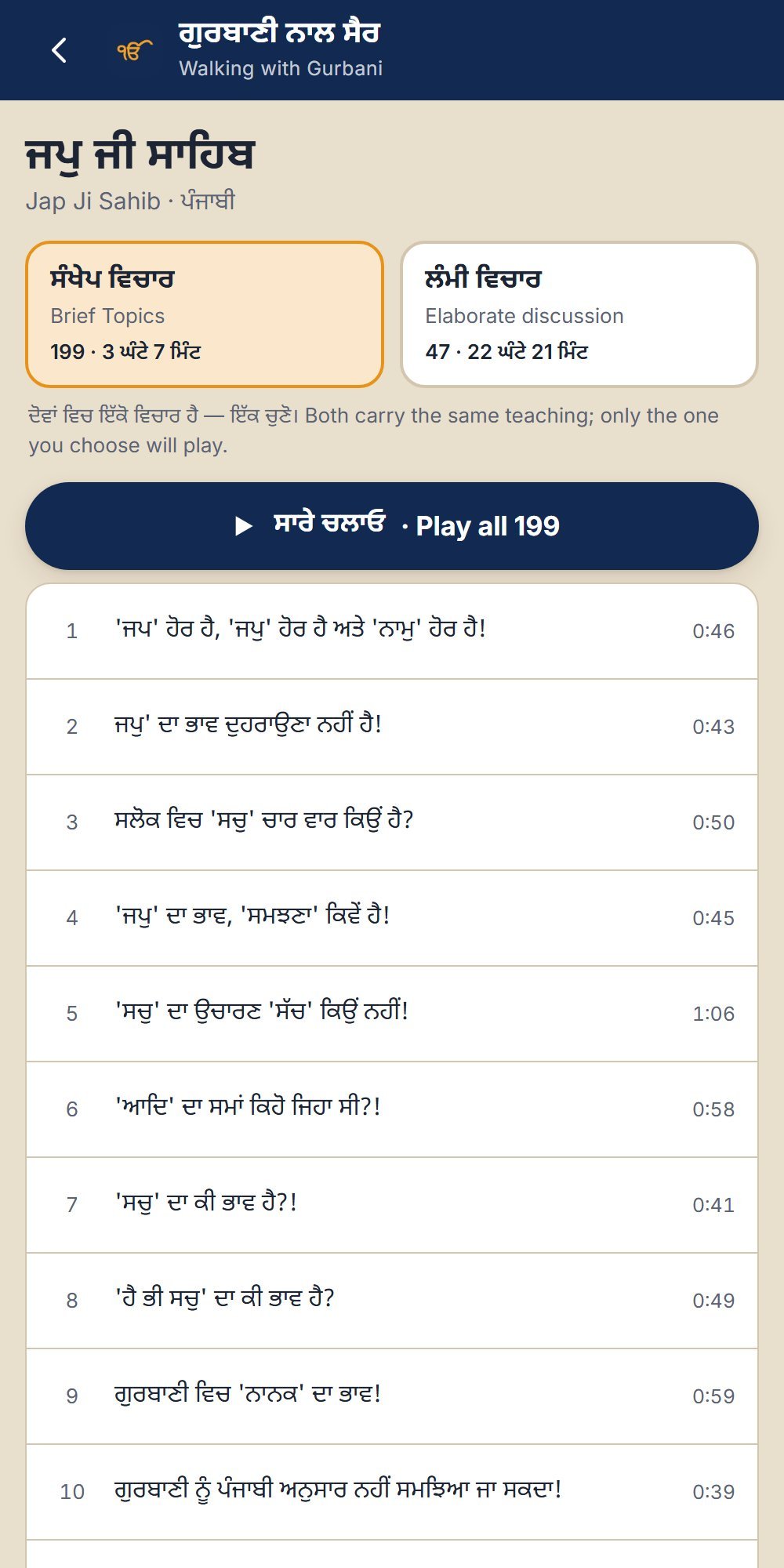
Walking with Gurbani gathers the Gurbani Foundation’s reels and talks by topic, so a daily walk can become time with Gurbani. Choose a topic, then choose Brief Topics (ਸੰਖੇਪ ਵਿਚਾਰ, short talks) or Elaborate discussion (ਲੰਮੀ ਵਿਚਾਰ, the same teaching at length), and every item plays one after another. Everything plays as audio, so listening continues with the phone locked in your pocket, and the earphone and lock-screen buttons work.
ਗੁਰਬਾਣੀ ਨਾਲ ਸੈਰ ਵਿੱਚ ਗੁਰਬਾਣੀ ਫ਼ਾਊਂਡੇਸ਼ਨ ਦੀਆਂ ਰੀਲਾਂ ਅਤੇ ਲੰਮੀਆਂ ਵਿਚਾਰਾਂ ਵਿਸ਼ੇ ਅਨੁਸਾਰ ਇਕੱਠੀਆਂ ਹਨ, ਤਾਂ ਜੋ ਰੋਜ਼ ਦੀ ਸੈਰ ਗੁਰਬਾਣੀ ਨਾਲ ਬਿਤਾਈ ਜਾ ਸਕੇ। ਵਿਸ਼ਾ ਚੁਣੋ, ਫਿਰ ਸੰਖੇਪ ਵਿਚਾਰ ਜਾਂ ਲੰਮੀ ਵਿਚਾਰ ਚੁਣੋ, ਅਤੇ ਸਭ ਇਕ ਤੋਂ ਬਾਅਦ ਇਕ ਚੱਲਦੀਆਂ ਹਨ। ਸਭ ਕੁਝ ਆਡੀਓ ਵਜੋਂ ਚੱਲਦਾ ਹੈ, ਇਸ ਲਈ ਫ਼ੋਨ ਲੌਕ ਕਰਕੇ ਜੇਬ ਵਿੱਚ ਰੱਖਣ ਉੱਤੇ ਵੀ ਸੁਣਨਾ ਜਾਰੀ ਰਹਿੰਦਾ ਹੈ।
What the app offers · ਐਪ ਵਿੱਚ ਕੀ ਹੈ
35 topics in five sections
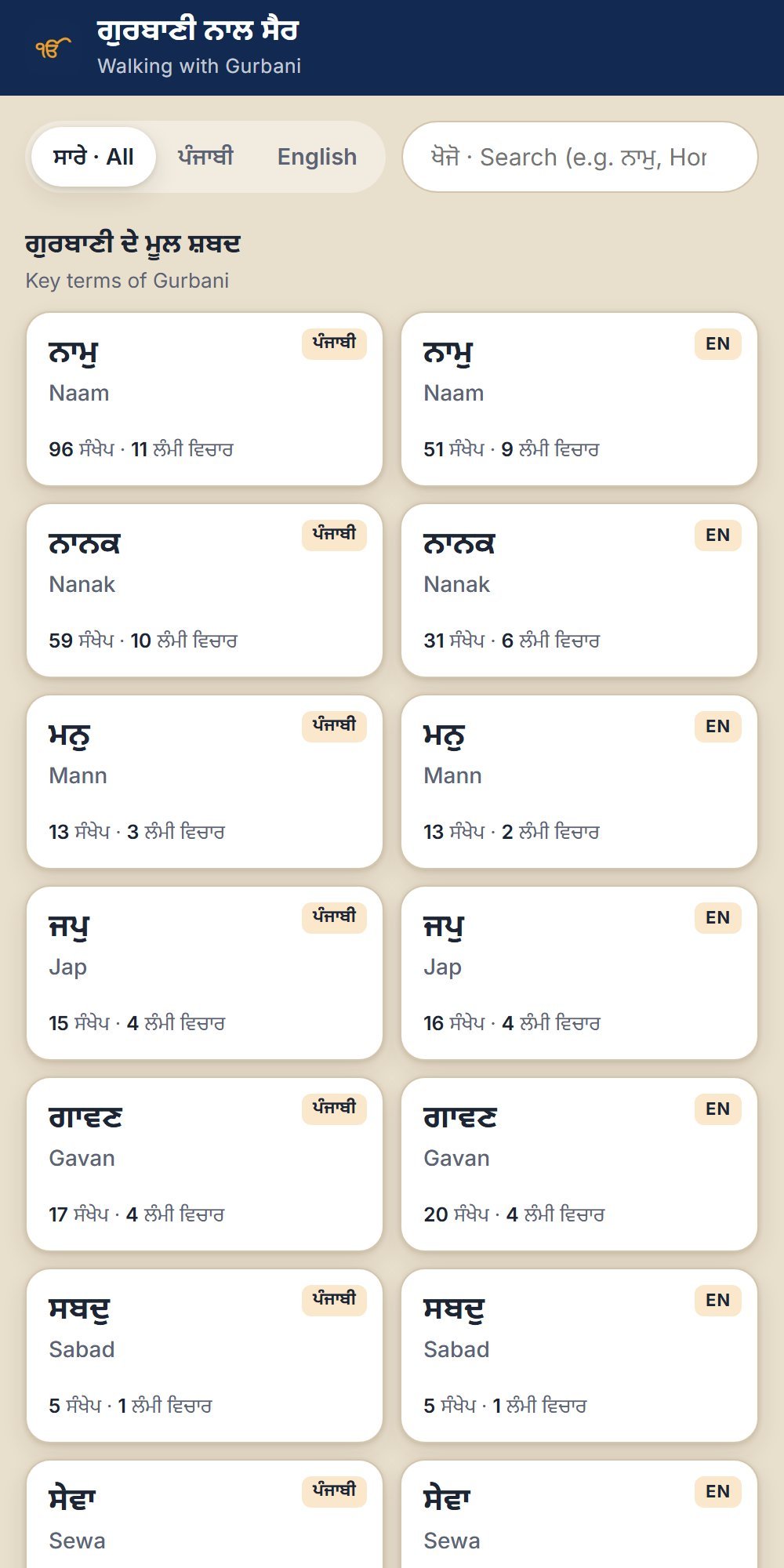
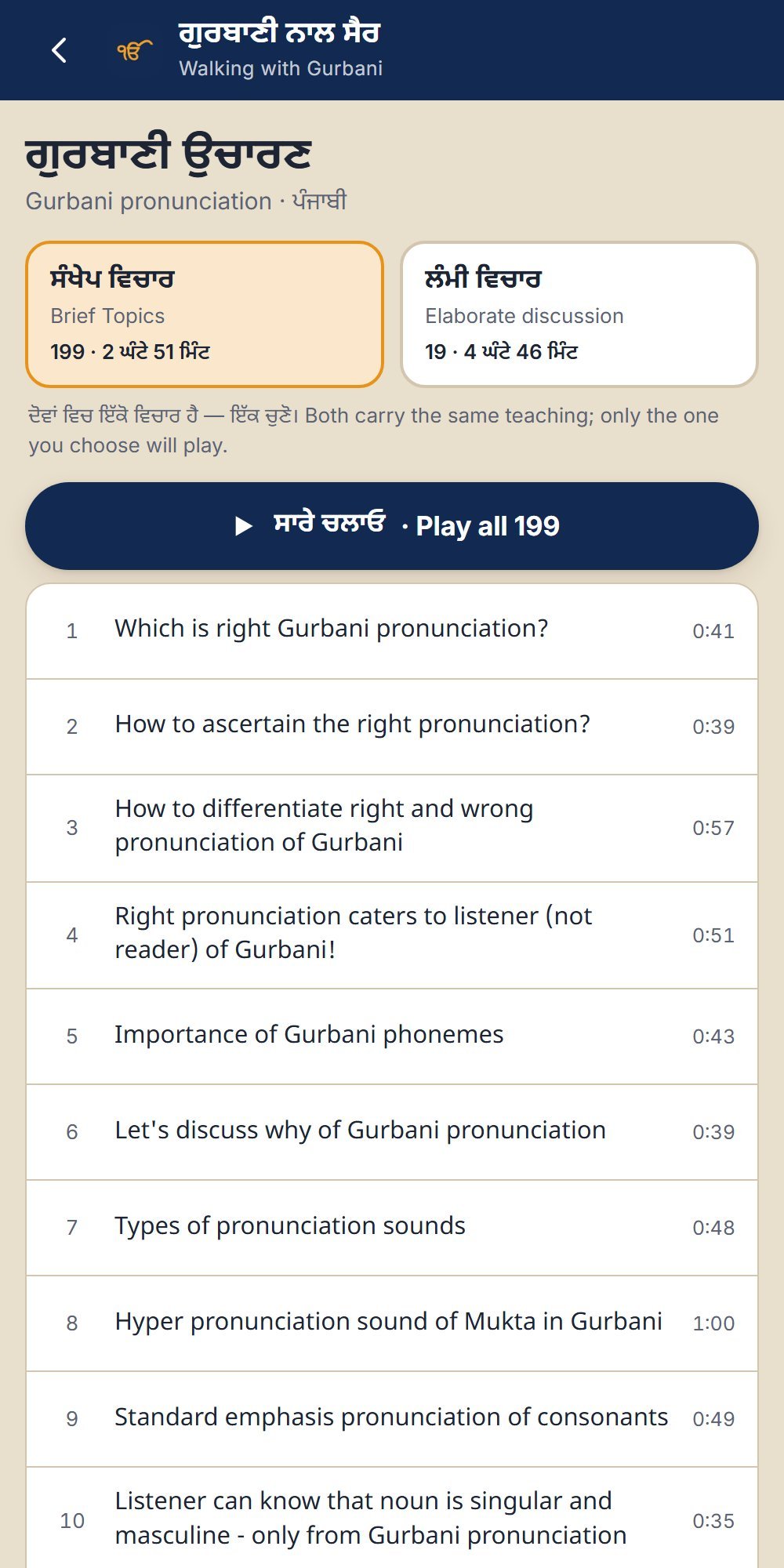
Key terms of Gurbani (ਨਾਮੁ, ਮਨੁ, ਸਬਦੁ, ਸੇਵਾ, ਹਉਮੈ, ਸਿਮਰਨ …), Bani interpretation (Japji Sahib, Hukamnama), pronunciation, grammar and language, Rehat Maryada and Gurpurabs, and Gurbani Kirtan and Katha.
੩੫ ਵਿਸ਼ੇ, ਪੰਜ ਹਿੱਸਿਆਂ ਵਿੱਚ: ਗੁਰਬਾਣੀ ਦੇ ਮੂਲ ਸ਼ਬਦ, ਬਾਣੀ ਵਿਚਾਰ (ਜਪੁ ਜੀ ਸਾਹਿਬ, ਹੁਕਮਨਾਮਾ), ਉਚਾਰਣ, ਵਿਆਕਰਣ ਅਤੇ ਭਾਸ਼ਾ, ਰਹਿਤ ਮਰਿਯਾਦਾ ਅਤੇ ਗੁਰਪੁਰਬ, ਗੁਰਬਾਣੀ ਕੀਰਤਨ ਅਤੇ ਕਥਾ।
Brief or elaborate
983 brief talks and 224 elaborate discussions, about 86 hours in all. The same teaching comes in two forms; choose one and the whole topic plays continuously.
੯੮੩ ਸੰਖੇਪ ਵਿਚਾਰਾਂ ਅਤੇ ੨੨੪ ਲੰਮੀਆਂ ਵਿਚਾਰਾਂ, ਕੁੱਲ ਲਗਭਗ ੮੬ ਘੰਟੇ। ਇਕ ਰੂਪ ਚੁਣੋ ਅਤੇ ਸਾਰਾ ਵਿਸ਼ਾ ਲਗਾਤਾਰ ਸੁਣੋ।
Phone in your pocket
Plays with the screen locked. The earphone buttons and the lock-screen controls pause, play and skip.
ਫ਼ੋਨ ਲੌਕ ਹੋਣ ਉੱਤੇ ਵੀ ਚੱਲਦੀ ਹੈ; ਈਅਰਫ਼ੋਨ ਅਤੇ ਲੌਕ-ਸਕਰੀਨ ਦੇ ਬਟਨਾਂ ਨਾਲ ਰੋਕੋ, ਚਲਾਓ ਜਾਂ ਅਗਲਾ ਸੁਣੋ।
Punjabi and English
Filter by language. Topics available in both languages are marked ਪੰਜਾਬੀ / EN.
ਭਾਸ਼ਾ ਅਨੁਸਾਰ ਚੋਣ — ਸਾਰੇ, ਪੰਜਾਬੀ ਜਾਂ English।
Pick up where you left off
Resumes where you stopped and marks with ✓ what you have already heard.
ਜਿੱਥੇ ਛੱਡਿਆ ਸੀ ਉੱਥੋਂ ਹੀ ਸ਼ੁਰੂ; ਸੁਣੀਆਂ ਹੋਈਆਂ ਉੱਤੇ ✓ ਦਾ ਨਿਸ਼ਾਨ।
Player controls
Speed from 0.75× to 2×, jump back or ahead 10 seconds, previous and next.
ਰਫ਼ਤਾਰ 0.75× ਤੋਂ 2×, 10 ਸਕਿੰਟ ਪਿੱਛੇ ਜਾਂ ਅੱਗੇ, ਪਿਛਲੀ ਅਤੇ ਅਗਲੀ।
Walk timer
Stop after 15 to 90 minutes, or at the end of the current talk.
ਸੈਰ ਦਾ ਟਾਈਮਰ: 15 ਤੋਂ 90 ਮਿੰਟ, ਜਾਂ ਚੱਲ ਰਹੀ ਵਿਚਾਰ ਦੇ ਅੰਤ ਉੱਤੇ।
Walk mode
A black, touch-proof screen for the pocket, so nothing is pressed by mistake; hold to unlock.
ਸੈਰ ਮੋਡ: ਜੇਬ ਲਈ ਕਾਲੀ ਸਕਰੀਨ ਜੋ ਛੂਹਣ ਨਾਲ ਨਹੀਂ ਬਦਲਦੀ; ਖੋਲ੍ਹਣ ਲਈ ਦਬਾ ਕੇ ਰੱਖੋ।
Search
Search topic names and talk titles, in Gurmukhi or English.
ਵਿਸ਼ਿਆਂ ਅਤੇ ਵਿਚਾਰਾਂ ਦੇ ਸਿਰਲੇਖਾਂ ਵਿੱਚ ਖੋਜ।
A look inside · ਐਪ ਦੀ ਝਲਕ
Swipe sideways to see them all.
Put it on your phone · ਆਪਣੇ ਫ਼ੋਨ ਵਿੱਚ ਲੈ ਜਾਓ
The app is meant for phones. It installs from the browser in about 10 seconds, with no app store needed, and then opens like any other app. Scan the QR code above, or open gurbanifoundation.com/walk/ on your phone.
ਇਹ ਐਪ ਫ਼ੋਨ ਲਈ ਬਣਾਈ ਗਈ ਹੈ। ਇਹ ਬ੍ਰਾਊਜ਼ਰ ਤੋਂ ਹੀ ਲਗਭਗ 10 ਸਕਿੰਟ ਵਿੱਚ ਲੱਗ ਜਾਂਦੀ ਹੈ — ਪਲੇ ਸਟੋਰ ਜਾਂ ਐਪ ਸਟੋਰ ਦੀ ਲੋੜ ਨਹੀਂ — ਅਤੇ ਫਿਰ ਆਮ ਐਪ ਵਾਂਗ ਖੁੱਲ੍ਹਦੀ ਹੈ।
Android (Chrome)
- Open the link in Chrome.
- Tap the ⋮ menu at the top right.
- Tap Install app. On some phones it says Add to Home screen.
- The Walking with Gurbani icon appears with your other apps.
ਐਂਡਰੌਇਡ (Chrome)
- ਲਿੰਕ ਨੂੰ Chrome ਵਿੱਚ ਖੋਲ੍ਹੋ।
- ਉੱਪਰ ਸੱਜੇ ਪਾਸੇ ⋮ ਮੀਨੂ ਦਬਾਓ।
- Install app ਜਾਂ Add to Home screen ਦਬਾਓ।
- ਗੁਰਬਾਣੀ ਨਾਲ ਸੈਰ ਦਾ ਆਈਕਨ ਤੁਹਾਡੀਆਂ ਬਾਕੀ ਐਪਸ ਨਾਲ ਆ ਜਾਵੇਗਾ।
iPhone (Safari)
- Open the link in Safari.
- Tap the Share button (the square with an arrow pointing up).
- Tap View More (⌄, the downward arrow) if you don’t see the next option.
- Tap Add to Home Screen, then Add.
- The Walking with Gurbani icon appears on your home screen.
ਆਈਫ਼ੋਨ (Safari)
- ਲਿੰਕ ਨੂੰ Safari ਵਿੱਚ ਖੋਲ੍ਹੋ।
- Share ਬਟਨ ਦਬਾਓ (ਉੱਪਰ ਵੱਲ ਤੀਰ ਵਾਲਾ ਚੌਰਸ)।
- ਜੇ ਅਗਲਾ ਵਿਕਲਪ ਨਾ ਦਿਸੇ ਤਾਂ ਹੋਰ ਦੇਖੋ (⌄) ਦਬਾਓ।
- Add to Home Screen ਅਤੇ ਫਿਰ Add ਦਬਾਓ।
- ਗੁਰਬਾਣੀ ਨਾਲ ਸੈਰ ਦਾ ਆਈਕਨ ਤੁਹਾਡੀ ਹੋਮ ਸਕਰੀਨ ਉੱਤੇ ਆ ਜਾਵੇਗਾ।
Questions · ਸਵਾਲ
Is it free? Yes: no charge, no advertising, no sign-up.
Does it need internet? Yes, to play the talks. Mobile data works; Wi-Fi saves data.
Will it keep playing when I lock the phone? Yes. Every talk plays as audio, so you can lock the phone and put it in your pocket; use the earphone buttons to pause or skip.
Where do the talks come from? From the Gurbani Foundation’s YouTube channel. New talks are added to the app as they are published.
Is it on the Play Store or App Store? It does not need to be. Add it to your home screen from the browser (see above) and it works like an app, on Android and on iPhone.
Is there an app for kirtan too? Yes: the Gurbani Kirtan App shows shabads Rahao first, stanza by stanza.