

ਗੁਰਬਾਣੀ ਕੀਰਤਨ ਐਪGurbani Kirtan App
ਗੁਰਬਾਣੀ ਕੀਰਤਨ ਕਰਨ ਵਾਲਿਆਂ ਲਈ — ਰਹਾਉ ਤੋਂ ਸ਼ੁਰੂ, ਹਰ ਅੰਕ ਤੋਂ ਬਾਅਦ ਮੁੜ ਰਹਾਉ
Classified themes of Gurbani – Rahao reappears with touch of screen – Prepare your performance list, in advance
Shabads of Sri Guru Granth Sahib | Rahao-first display | 56 themes in your own order | shareable kirtan lists | Android and iPhone | Works offline | Free

ਸਕੈਨ ਕਰੋ · Scan with your phone camera
gurbanifoundation.com/kirtan
In kirtan, the singer begins with the Rahao and returns to it after every stanza. The Gurbani Kirtan App shows each shabad in exactly that order: it opens on the Rahao, and each tap on the screen brings the next stanza, then the Rahao again, until the shabad is complete. Shabads from Sri Guru Granth Sahib are arranged by theme, by Mahalla, by Bhagat and by Vaar, and you can prepare your own lists for any occasion beforehand.
ਕੀਰਤਨ ਵਿੱਚ ਸ਼ਬਦ ਦਾ ਗਾਇਨ ਰਹਾਉ ਤੋਂ ਸ਼ੁਰੂ ਹੁੰਦਾ ਹੈ ਅਤੇ ਹਰ ਅੰਕ ਤੋਂ ਬਾਅਦ ਮੁੜ ਰਹਾਉ ਗਾਇਆ ਜਾਂਦਾ ਹੈ। ਗੁਰਬਾਣੀ ਕੀਰਤਨ ਐਪ ਹਰ ਸ਼ਬਦ ਨੂੰ ਇਸੇ ਤਰਤੀਬ ਵਿੱਚ ਵਿਖਾਉਂਦਾ ਹੈ: ਪਹਿਲਾਂ ਰਹਾਉ, ਸਕਰੀਨ ਉੱਤੇ ਟੈਪ ਕਰਨ ਨਾਲ ਪਹਿਲਾ ਅੰਕ, ਫਿਰ ਰਹਾਉ, ਫਿਰ ਦੂਜਾ ਅੰਕ — ਸ਼ਬਦ ਦੀ ਸਮਾਪਤੀ ਤਕ। ਸ੍ਰੀ ਗੁਰੂ ਗ੍ਰੰਥ ਸਾਹਿਬ ਦੇ ਸ਼ਬਦ ਵਿਸ਼ਿਆਂ, ਮਹਲਿਆਂ, ਭਗਤਾਂ ਅਤੇ ਵਾਰਾਂ ਅਨੁਸਾਰ ਮਿਲਦੇ ਹਨ, ਅਤੇ ਮੌਕੇ ਅਨੁਸਾਰ ਆਪਣੀਆਂ ਸੂਚੀਆਂ ਪਹਿਲਾਂ ਹੀ ਤਿਆਰ ਕੀਤੀਆਂ ਜਾ ਸਕਦੀਆਂ ਹਨ।
What the app offers · ਐਪ ਵਿੱਚ ਕੀ ਹੈ
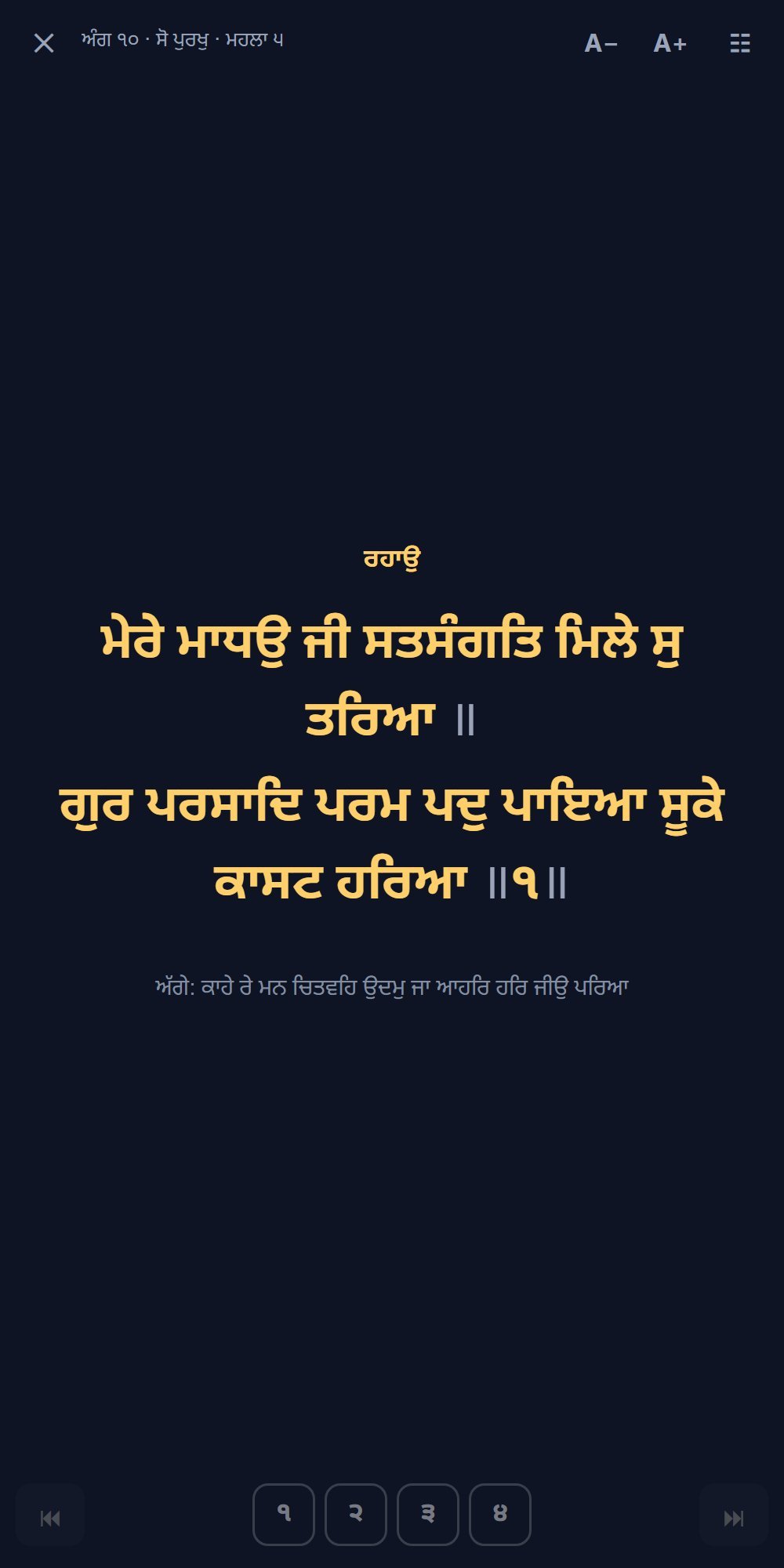
Rahao first, then every stanza
The shabad opens on the Rahao. Tap the right side for the next stanza, then the Rahao again; tap the left side to go back. The phone’s Back button also steps back one stanza.
ਸ਼ਬਦ ਰਹਾਉ ਤੋਂ ਖੁੱਲ੍ਹਦਾ ਹੈ। ਸੱਜੇ ਪਾਸੇ ਟੈਪ ਕਰਨ ਨਾਲ ਅਗਲਾ ਅੰਕ ਅਤੇ ਫਿਰ ਰਹਾਉ; ਖੱਬੇ ਪਾਸੇ ਟੈਪ ਕਰਨ ਨਾਲ ਪਿੱਛੇ। ਫ਼ੋਨ ਦਾ Back ਬਟਨ ਵੀ ਇਕ ਅੰਕ ਪਿੱਛੇ ਲੈ ਜਾਂਦਾ ਹੈ।
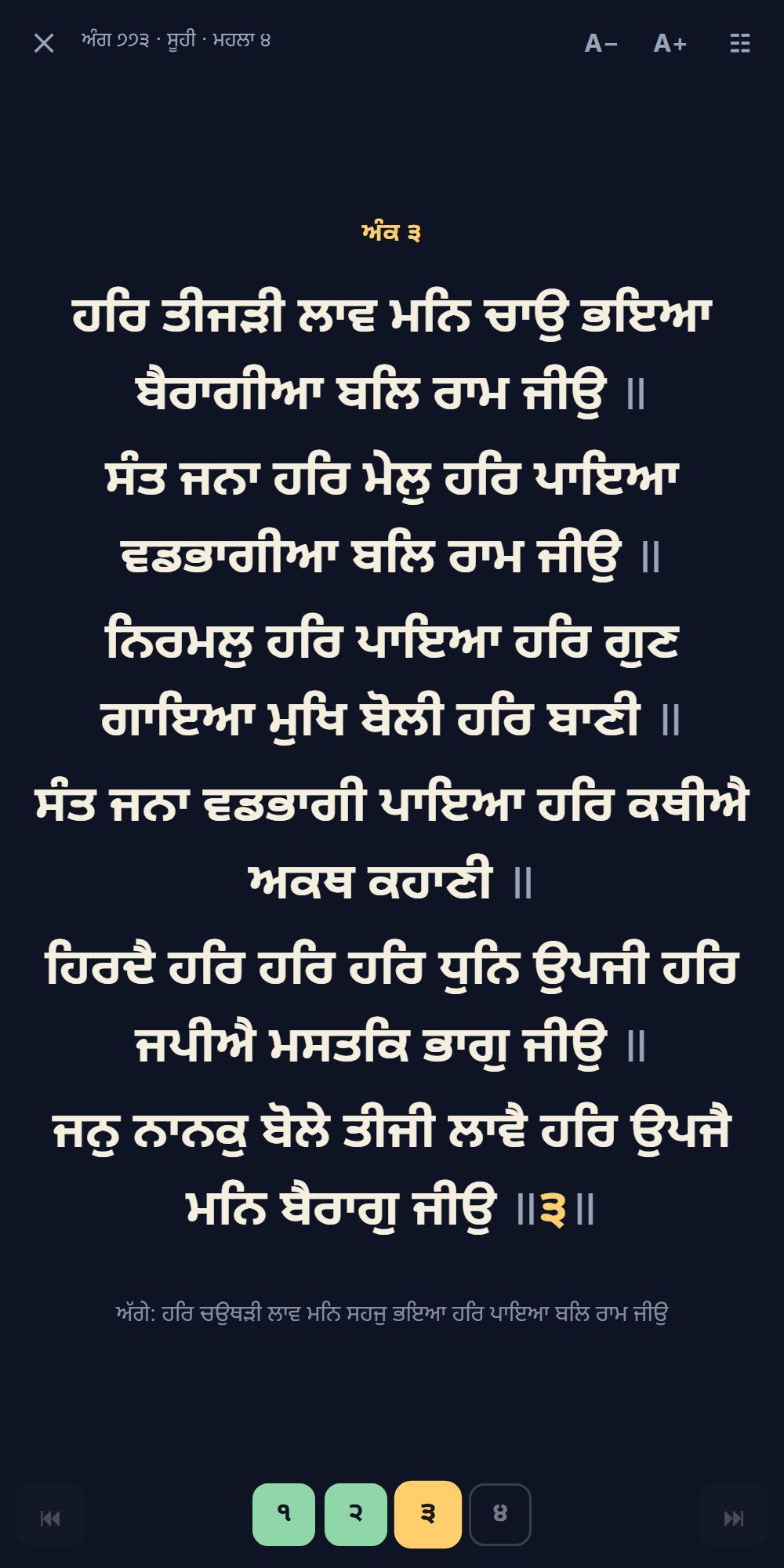
Stanza numbers at the bottom
All the stanza numbers of the shabad are shown from the start, so the singer knows how many there are. Sung stanzas turn green, the current one gold; tap any number to sing it again.
ਹੇਠਾਂ ਸ਼ਬਦ ਦੇ ਸਾਰੇ ਅੰਕਾਂ ਦੇ ਨੰਬਰ ਸ਼ੁਰੂ ਤੋਂ ਹੀ ਦਿਸਦੇ ਹਨ। ਗਾਏ ਜਾ ਚੁੱਕੇ ਅੰਕ ਹਰੇ, ਚੱਲ ਰਿਹਾ ਅੰਕ ਸੁਨਹਿਰੀ; ਕਿਸੇ ਵੀ ਨੰਬਰ ਉੱਤੇ ਟੈਪ ਕਰਕੇ ਉਹ ਅੰਕ ਦੁਬਾਰਾ ਗਾਓ।
Every Rahao in its place
Where a shabad has two, three or more Rahaos, each Rahao is repeated until the next one comes. A Rahao Dooja is sung once at the end. A Salok that precedes a shabad is shown first.
ਜਿਸ ਸ਼ਬਦ ਵਿੱਚ ਦੋ, ਤਿੰਨ ਜਾਂ ਵੱਧ ਰਹਾਉ ਹਨ, ਉੱਥੇ ਹਰ ਰਹਾਉ ਅਗਲੇ ਰਹਾਉ ਤਕ ਦੁਹਰਾਇਆ ਜਾਂਦਾ ਹੈ। ‘ਰਹਾਉ ਦੂਜਾ’ ਅੰਤ ਵਿੱਚ ਇਕ ਵਾਰ ਆਉਂਦਾ ਹੈ। ਸ਼ਬਦ ਤੋਂ ਪਹਿਲਾਂ ਵਾਲਾ ਸਲੋਕੁ ਸਭ ਤੋਂ ਪਹਿਲਾਂ ਵਿਖਾਇਆ ਜਾਂਦਾ ਹੈ।
Kirtan by theme
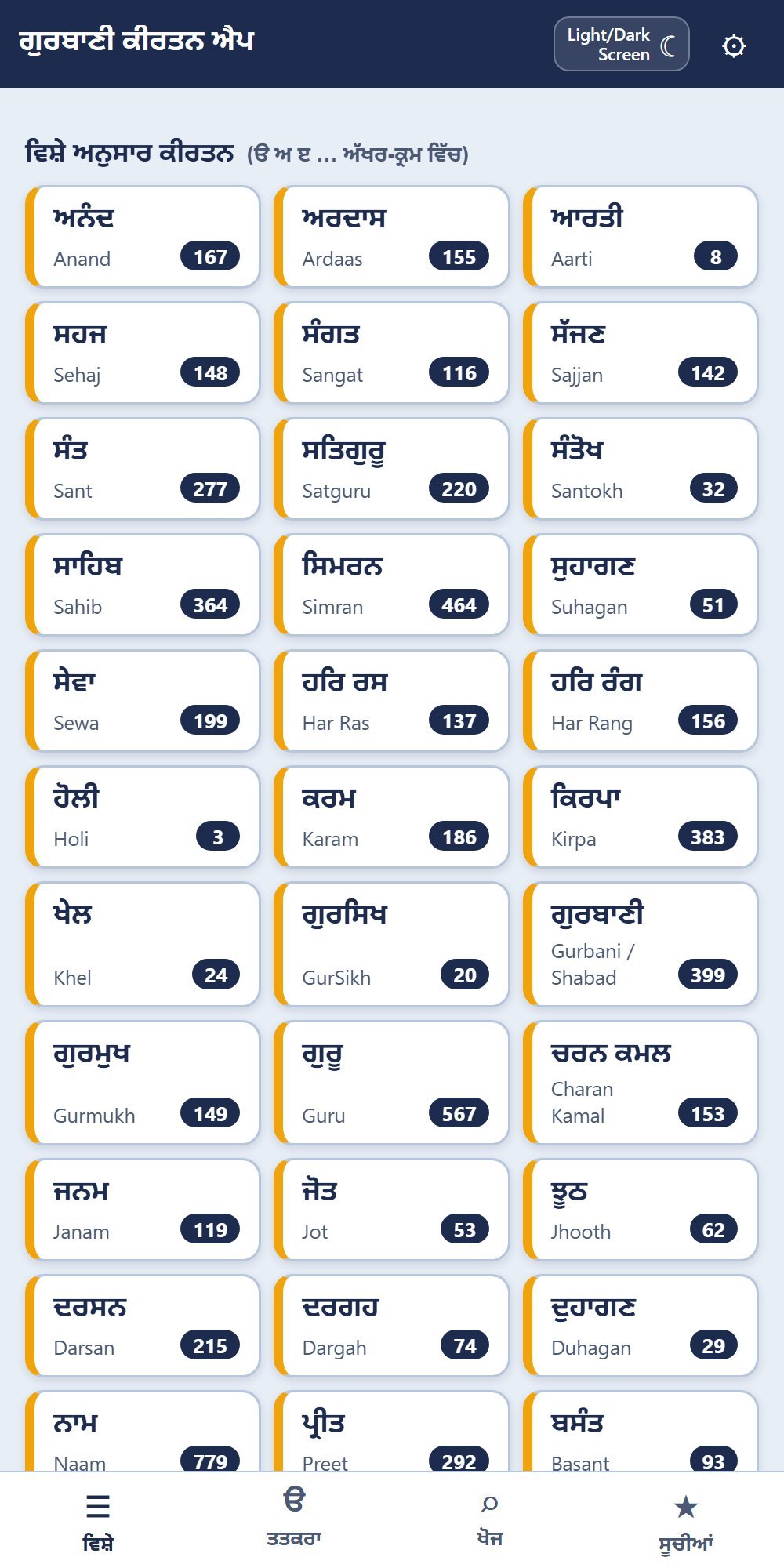
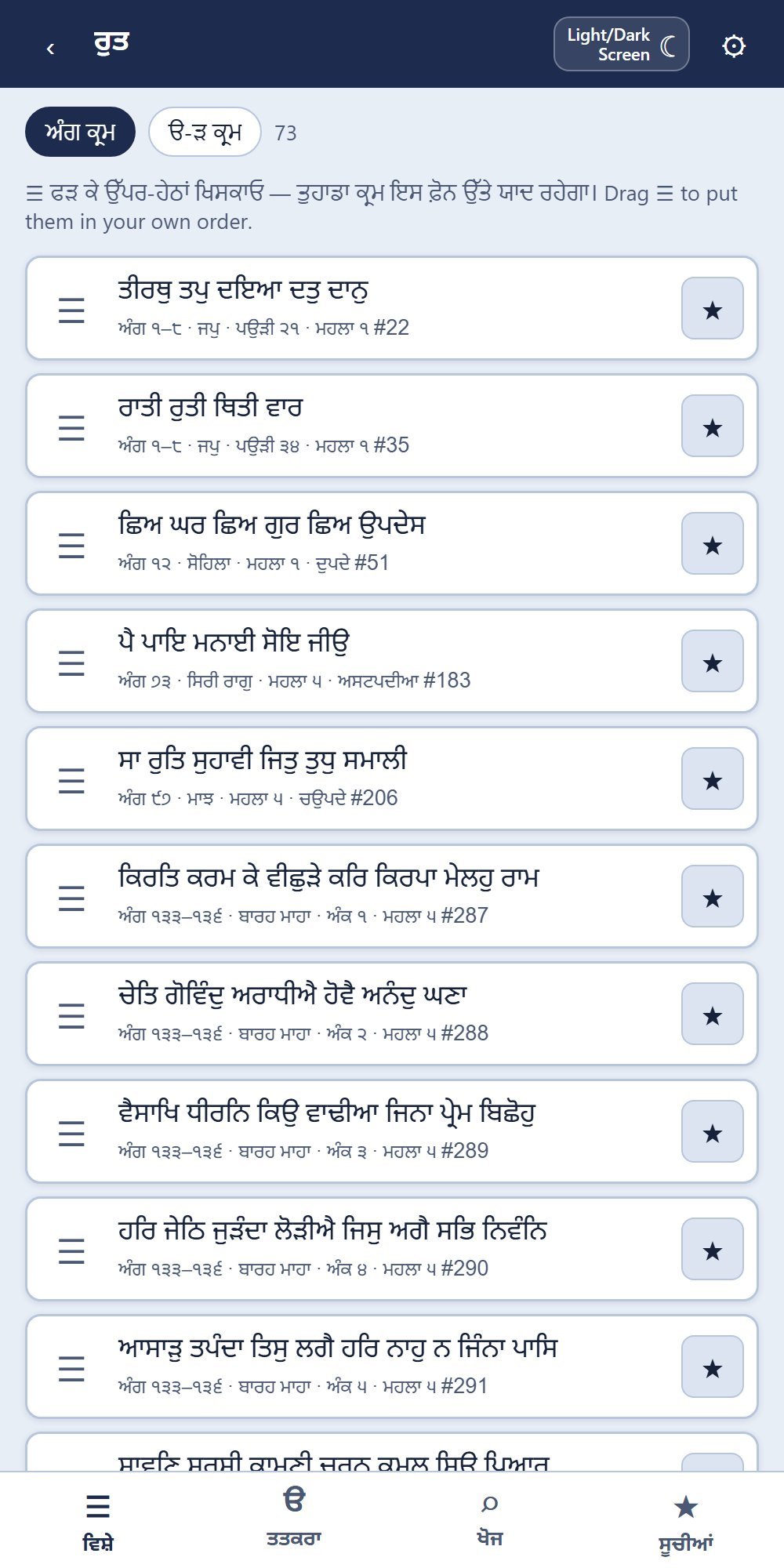
56 themes in Gurmukhi alphabetical order, from ਅਨੰਦ, ਅਰਦਾਸ and ਆਰਤੀ to ਰੁਤ and ਲਾਵਾਂ, each shabad placed by its Rahao. The Pauris of Japji Sahib and the stanzas of both Barah Mahas are included too.
੪੨ ਵਿਸ਼ੇ ਅੱਖਰ-ਕ੍ਰਮ ਵਿੱਚ — ਅਨੰਦ, ਅਰਦਾਸ, ਆਰਤੀ ਤੋਂ ਰੁਤ ਅਤੇ ਲਾਵਾਂ ਤਕ — ਹਰ ਸ਼ਬਦ ਉਸ ਦੇ ਰਹਾਉ ਅਨੁਸਾਰ। ਜਪੁ ਜੀ ਸਾਹਿਬ ਦੀਆਂ ਪਉੜੀਆਂ ਅਤੇ ਦੋਹਾਂ ਬਾਰਹ ਮਾਹਾ ਦੇ ਅੰਕ ਵੀ ਵਿਸ਼ਿਆਂ ਵਿੱਚ ਸ਼ਾਮਲ ਹਨ।
Your own order in every theme
Drag the compositions of any theme up and down into your own order. The app remembers it, and plays through the theme in that order.
ਹਰ ਵਿਸ਼ੇ ਵਿੱਚ ਰਚਨਾਵਾਂ ਨੂੰ ਖਿਸਕਾ ਕੇ ਆਪਣੇ ਕ੍ਰਮ ਵਿੱਚ ਰੱਖੋ। ਐਪ ਉਹ ਕ੍ਰਮ ਯਾਦ ਰੱਖਦੀ ਹੈ ਅਤੇ ਉਸੇ ਕ੍ਰਮ ਵਿੱਚ ਅਗਲਾ ਸ਼ਬਦ ਲਿਆਉਂਦੀ ਹੈ।
By Mahalla, Bhagat, Vaar and Raag
Every composition of each Guru Sahib, a section for each Bhagat, each Vaar pauri by pauri, and each Raag.
ਹਰ ਮਹਲੇ ਦੀਆਂ ਸਾਰੀਆਂ ਰਚਨਾਵਾਂ, ਹਰ ਭਗਤ, ਹਰ ਵਾਰ ਅਤੇ ਹਰ ਰਾਗ ਦਾ ਵੱਖਰਾ ਹਿੱਸਾ।
All shabads, alphabetically
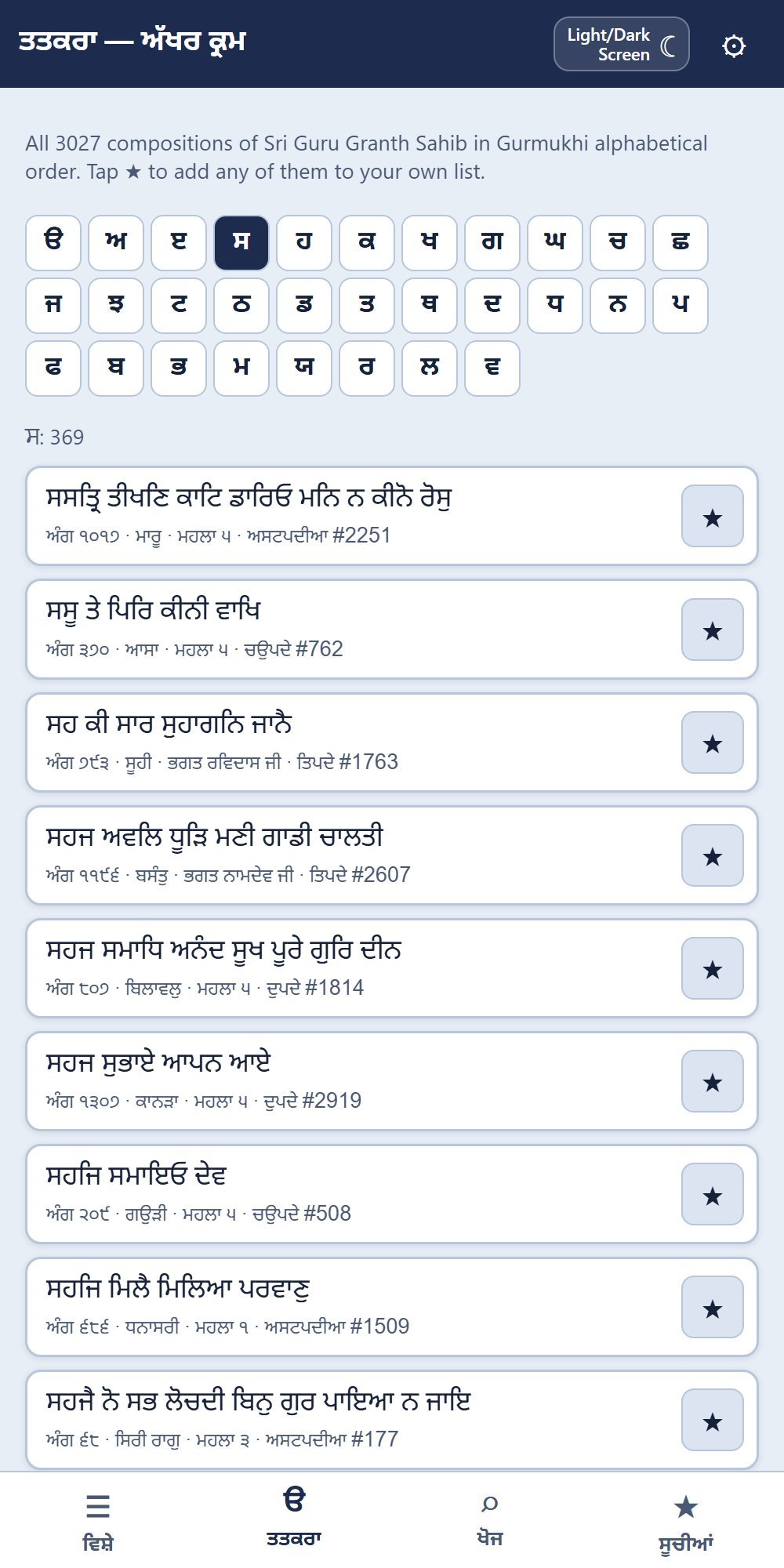
Every composition in Gurmukhi alphabetical order (ਤਤਕਰਾ), so you can choose entirely by your own preference.
ਸਾਰੀਆਂ ਰਚਨਾਵਾਂ ਗੁਰਮੁਖੀ ਅੱਖਰ-ਕ੍ਰਮ (ਤਤਕਰਾ) ਵਿੱਚ, ਤਾਂ ਜੋ ਆਪਣੀ ਪਸੰਦ ਦੀ ਕੋਈ ਵੀ ਰਚਨਾ ਚੁਣੀ ਜਾ ਸਕੇ।
Kirtan lists you can share
Make lists for any occasion and drag them into order. Send a list by WhatsApp or email; the receiver imports it into their own app.
ਮੌਕੇ ਅਨੁਸਾਰ ਸੂਚੀਆਂ ਬਣਾਓ ਅਤੇ ਤਰਤੀਬ ਖਿਸਕਾ ਕੇ ਬਦਲੋ। ਸੂਚੀ WhatsApp ਜਾਂ ਈਮੇਲ ਰਾਹੀਂ ਭੇਜੋ; ਲੈਣ ਵਾਲਾ ਉਸ ਨੂੰ ਆਪਣੀ ਐਪ ਵਿੱਚ Import ਕਰ ਲੈਂਦਾ ਹੈ।
Search
Search by the first letters of a line, by words, or by Ang, with an on-screen Gurmukhi letter pad.
ਤੁਕ ਦੇ ਪਹਿਲੇ ਅੱਖਰਾਂ, ਸ਼ਬਦਾਂ ਜਾਂ ਅੰਗ ਨਾਲ ਖੋਜ।
Made for the stage
Large text you can resize, a Light/Dark Screen button, the screen stays on, and Bluetooth page-turner pedals work.
ਵੱਡੇ ਅੱਖਰ, Light/Dark Screen ਬਟਨ, ਸਕਰੀਨ ਬੰਦ ਨਹੀਂ ਹੁੰਦੀ, ਅਤੇ ਬਲੂਟੁੱਥ ਪੈਡਲ ਨਾਲ ਵੀ ਚੱਲਦੀ ਹੈ।
Works without internet
Once opened or installed, the whole app works offline. Free, no advertising, no sign-up.
ਇਕ ਵਾਰ ਖੋਲ੍ਹਣ ਜਾਂ ਇੰਸਟਾਲ ਕਰਨ ਤੋਂ ਬਾਅਦ ਇੰਟਰਨੈੱਟ ਤੋਂ ਬਿਨਾਂ ਚੱਲਦੀ ਹੈ। ਮੁਫ਼ਤ, ਕੋਈ ਸਾਈਨ-ਅੱਪ ਨਹੀਂ।
A look inside · ਐਪ ਦੀ ਝਲਕ
Swipe sideways to see them all.
Put it on your phone · ਆਪਣੇ ਫ਼ੋਨ ਵਿੱਚ ਲੈ ਜਾਓ
The app is meant for phones. It installs from the browser in about 10 seconds, with no app store needed, and then opens like any other app. Scan the QR code above, or open gurbanifoundation.com/kirtan/ on your phone.
ਇਹ ਐਪ ਫ਼ੋਨ ਲਈ ਬਣਾਈ ਗਈ ਹੈ। ਇਹ ਬ੍ਰਾਊਜ਼ਰ ਤੋਂ ਹੀ ਲਗਭਗ 10 ਸਕਿੰਟ ਵਿੱਚ ਲੱਗ ਜਾਂਦੀ ਹੈ — ਪਲੇ ਸਟੋਰ ਜਾਂ ਐਪ ਸਟੋਰ ਦੀ ਲੋੜ ਨਹੀਂ — ਅਤੇ ਫਿਰ ਆਮ ਐਪ ਵਾਂਗ ਖੁੱਲ੍ਹਦੀ ਹੈ।
Android (Chrome)
- Open the link in Chrome.
- Tap the ⋮ menu at the top right.
- Tap Install app. On some phones it says Add to Home screen.
- The Gurbani Kirtan icon appears with your other apps.
ਐਂਡਰੌਇਡ (Chrome)
- ਲਿੰਕ ਨੂੰ Chrome ਵਿੱਚ ਖੋਲ੍ਹੋ।
- ਉੱਪਰ ਸੱਜੇ ਪਾਸੇ ⋮ ਮੀਨੂ ਦਬਾਓ।
- Install app ਜਾਂ Add to Home screen ਦਬਾਓ।
- ਗੁਰਬਾਣੀ ਕੀਰਤਨ ਐਪ ਦਾ ਆਈਕਨ ਤੁਹਾਡੀਆਂ ਬਾਕੀ ਐਪਸ ਨਾਲ ਆ ਜਾਵੇਗਾ।
iPhone (Safari)
- Open the link in Safari.
- Tap the Share button (the square with an arrow pointing up).
- Tap View More (⌄, the downward arrow) if you don’t see the next option.
- Tap Add to Home Screen, then Add.
- The Gurbani Kirtan icon appears on your home screen.
ਆਈਫ਼ੋਨ (Safari)
- ਲਿੰਕ ਨੂੰ Safari ਵਿੱਚ ਖੋਲ੍ਹੋ।
- Share ਬਟਨ ਦਬਾਓ (ਉੱਪਰ ਵੱਲ ਤੀਰ ਵਾਲਾ ਚੌਰਸ)।
- ਜੇ ਅਗਲਾ ਵਿਕਲਪ ਨਾ ਦਿਸੇ ਤਾਂ ਹੋਰ ਦੇਖੋ (⌄) ਦਬਾਓ।
- Add to Home Screen ਅਤੇ ਫਿਰ Add ਦਬਾਓ।
- ਗੁਰਬਾਣੀ ਕੀਰਤਨ ਐਪ ਦਾ ਆਈਕਨ ਤੁਹਾਡੀ ਹੋਮ ਸਕਰੀਨ ਉੱਤੇ ਆ ਜਾਵੇਗਾ।
Make your lists inside the installed app: on iPhone, lists made in Safari do not carry over to the installed app.
ਆਪਣੀਆਂ ਸੂਚੀਆਂ ਇੰਸਟਾਲ ਕੀਤੀ ਐਪ ਵਿੱਚ ਹੀ ਬਣਾਓ — iPhone ਉੱਤੇ Safari ਵਿੱਚ ਬਣਾਈਆਂ ਸੂਚੀਆਂ ਇੰਸਟਾਲ ਕੀਤੀ ਐਪ ਵਿੱਚ ਨਹੀਂ ਆਉਂਦੀਆਂ।
Questions · ਸਵਾਲ
Is it free? Yes: no charge, no advertising, no sign-up.
Is it on the Play Store or App Store? It does not need to be. Add it to your home screen from the browser (see above) and it works like an app, on Android and on iPhone.
Does it work without internet? Yes. After the first visit the complete app, with all the shabads, is stored on the phone.
Where are my lists kept? On your phone. To keep a backup or give a list to someone, open the list and tap ਭੇਜੋ / Share: the phone’s share menu opens (WhatsApp, email…). The other person opens the app’s ਸੂਚੀਆਂ tab, taps ਸੂਚੀ ਲਵੋ / Import and chooses the file, and the list appears in their app.
Is my own order in a theme kept? Yes, on your phone. Tap ਮੇਰਾ ਕ੍ਰਮ, ਅੰਗ ਕ੍ਰਮ or ੳ-ੜ ਕ੍ਰਮ to switch between your order, Ang order and alphabetical order.
How are shabads placed under a theme? By the Rahao, which carries the central idea of the shabad. A composition without a Rahao, such as a Chhant, a Pauri of Japji Sahib or a stanza of Barah Maha, is placed by its own text; every Barah Maha stanza is also in ਰੁਤ.